

LinkedIn Premium is now available for company pages. This new LinkedIn paid plan offers companies a number of add-on features to boost followers and reach. Read on to learn what it offers and whether it’d be a good investment for your company!
What is LinkedIn premium for company pages?
In April 2024, LinkedIn launched a premium option for company pages to help companies grow their presence on LinkedIn and get more value from their page. This subscription service is being gradually to all company pages.
Key features of LinkedIn Company Premium
1. Auto-invite engaged users to follow your page
This is a big one to grow reach and save time. This feature automatically invites anyone who has publicly interacted with the company posts, whether that is by Liking, Commenting or Reposting, in the last 30 days to follow your page. Invites continue to be sent every time a member engages with posts from the page until that member decides to follow the page. By automatically converting engagement into followers, businesses can grow their page organically with minimal effort. Without this feature, employees and page admins are limited to inviting 1st– degree connections to follow the page, and this has to be done manually. There are limits on the number of invites available each month.
2. Identify visitors to your page
While LinkedIn analytics already offers insights into the demographics of your audience, the Premium plan takes it a step further by identifying individual visitors. This means Page Admins can see exactly who is checking out the page, allowing for highly targeted outreach and relationship-building. For businesses looking to target particular prospects or to understand their audience on a deeper level, this is an invaluable feature.
There are however two snags to this feature! One, LinkedIn limits the data to one page visitor a day, and two the privacy setting. Visitors to a Premium page will see a pop-up asking them to consent to their identify being shared with the page admin. The big shocker here is if the visitor declines, that setting stays in place forever unless the LinkedIn user proactively updates it within their Settings. We doubt very much that many users would even think to do that! Asking for consent is the right thing to do, but LinkedIn should be clearer about how the privacy setting works and how to update it.
3. Customised Call-to-Action (CTA Buttons)
With LinkedIn Premium, you can add tailored CTA buttons to your page that appear at the top of your page, next to your posts in the feed, and in search results. The available options include “Contact Us,” “Learn More,” “Register,” “Sign Up,” and “Visit Website”.
A Page with a Custom CTA looks like this

Compare this to the free plan:
The CTA on the standard page looks like this for non-followers

And like this for followers

You’ll notice in these screenshots that actions other than Follow or Message are pretty hidden, making this feature brilliant for driving action from visits to your company page.
4. AI-Powered Post-Writing Assistance
Finding the time and inspiration to consistently create engaging content is never easy. This feature helps take that pain away by generating a first draft based on your ideas. While the jury may be out on the effectiveness of AI-generated content, it serves as a helpful starting point, saving time and kick-starting inspiration for your posts.
5. Prominent Customer Testimonial
Premium subscribers can showcase customer testimonials directly on the page in a prominent position. A single testimonial can be up to 250 characters in length (so a little tweaking of the original wording may be required). This feature is a fantastic way to add social proof to your page – helping your brand to build credibility and trust.
6. LinkedIn Premium Logo
While adding a shiny badge on your page might seem a bit ‘meh’, having the LinkedIn Premium logo displayed on your page conveys professionalism and authority to page visitors. And nothing is as important in B2B marketing as trust and credibility!
7. Credibility Highlights
This feature is very similar to the featured section on personal profiles to showcase your company. Page super admins can add up to four highlights to the page, which will appear in the About section. Credibility Highlights is a brilliant way to display awards, certifications, news features or other notable highlights, using images, text or urls. This is an amazing feature for social proof and employer branding.
Like to know more about the features available?
This page from LinkedIn Help is worth bookmarking for a good features overview.
How will I know when our page has LinkedIn Premium?
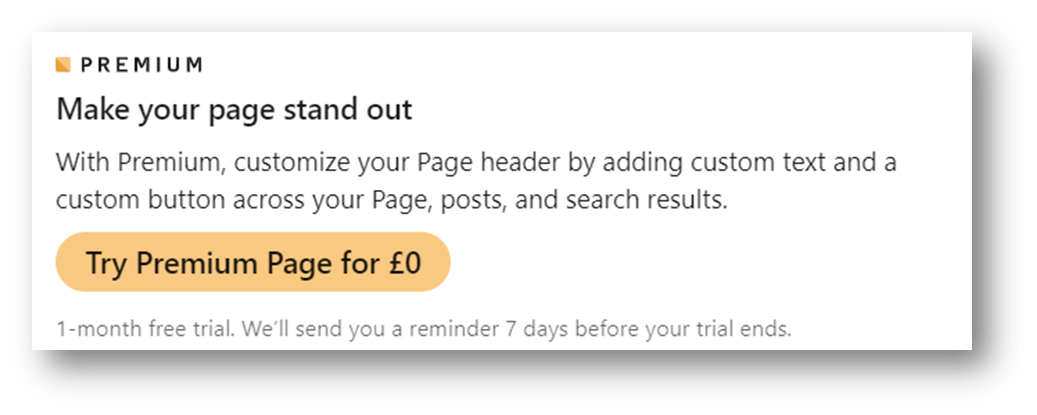
Like all new LinkedIn features, Premium pages are rolling out gradually. To check if your page has Premium, open your page in Admin view and select “Edit Page” from the left-hand side menu. If available, you should see a message like the one below offering you a trial or the option to sign up.
What does LinkedIn premium for company pages cost?
The cost depends on the location of your page. In the UK, the monthly fee is $99 or $839.88 for an annual plan.
Is it worth investing in?
Working out whether LinkedIn Premium is worth the cost depends on your company’s size and LinkedIn goals. Here are some factors to help you decide:
1. Company Page Posting Levels: If you rarely or infrequently post on your page, the additional features will be of little value.
2. Current Engagement Levels: If your company posts already get substantial engagement, the auto-invite feature can help convert this into a larger follower base.
3. How Important Are Detailed Analytics: Businesses seeking deeper insights into their page visitors will find significant value in being able the identify of page visitors.
4. Marketing Budget: $100 a month can be a hefty investment for a small business. Assess the value of the features in terms of time saved, follower growth and lead gen opportunities. Just one hour saved in business development outreach might be enough to justify the monthly subscription.
5. Content Strategy: If generating high-quality content is a challenge, the AI post-writing assistance might be a valuable tool.
Try Before You Buy
Please please take advantage of any free trial you’re offered. Make sure to fully utilise all available features to evaluate their impact on your business. If Premium saves you even an hour a month and helps grow your page and lead generation, signing up is a no-brainer.
Conclusion
LinkedIn Premium Company Pages could be a game-changer for more effective prospecting and to grow your page followers. Take advantage of any free trial and test the impact of the additional features to make an informed decision about investing in LinkedIn Premium.
If you’d like help achieving more with LinkedIn or any aspect of B2B social media, get in touch to arrange a free strategy call.


0 Comments