

So, you’ve set up your LinkedIn company page – what’s next? We’re going to be straight with you, the follower growth won’t just happen (if only LinkedIn was that easy!).
Here are some practical steps you can take to grow your page following:
- Make sure your Company page is complete
Having a complete and professional looking company page ensures you make a strong first impression. Upload an eye-catching banner, logo and fill out the overview, organisation information and call-to-action button. Fill your page information with relevant keywords to help your page appear in search results on and off LinkedIn. - Invite Connections to connect
Page admins can invite their first-degree connections to follow their page. Simply select the ‘Invite Connections’ option on the right-hand side of your company page. The number of invitations you can send is capped at 250 a month; though once a connection has accepted your invitation, LinkedIn adds 1 credit back to the number of invitations available for that month.Before you go crazy inviting everyone you know to, a word of caution. Be selective in who you invite to follow your page. Your friends might want to show support for your business, but if the content is not relevant to them and they’ve no intention of engaging with the posts, you’ll pay the price further down the line with lower engagement rates. Inviting select friends or former colleagues to follow your page is a sensible approach when you’re starting out in order to build momentum behind your page, but we caution against over-using this growth strategy.
- Promote your page on other channels
Make it easy for prospective followers to find your page. Add a ‘Follow button’ on your website, blog, newsletters and to your email signatures. - Invite LinkedIn members to Follow your page in posts
You can do this on your personal profile or as a call-to-action at the end of a post, either in the post copy or at the end of a video or Carousel post. Importantly – give people a reason to follow your page. For example, ‘to see more posts on this topic, why not follow our page’.Remember, it’s not just followers of your page who’ll see your page content; when a follower engages with one of your posts, that post will then appear in their network’s newsfeed creating an opportunity to gain new followers.
- Post content people want to see
You might be posting daily but if your audience are not interested in the content growing the page is going to be difficult. Spend some time brainstorming what topics your buyers are most interested in. Review the topics your competitors post about and how they’re performing. The LinkedIn Content suggestions feature is also a good source for third party content you can curate on your page.Consider also how your content will help answer the questions prospective buyers have – 74% of buyers say they buy from the company that was first to add value and insight (Source Corporate Vision), so it pays to post content that ticks those boxes.
- Test and learn to refine your content strategy
Use the ‘Analytics’ tab on your page to work out which of your posts are driving the highest engagement and impressions. With these insights in hand, you’ll learn which topics and formats are resonating best with your audience. Experiment with posting at different times of day to learn when your followers are most responsive. Many scheduling tools offer insights on the best days and time of day to post. Tip – if you’re posting natively, keep a log of the times you post as LinkedIn analytics will only show you the date of the post not the time. - Activate your employees
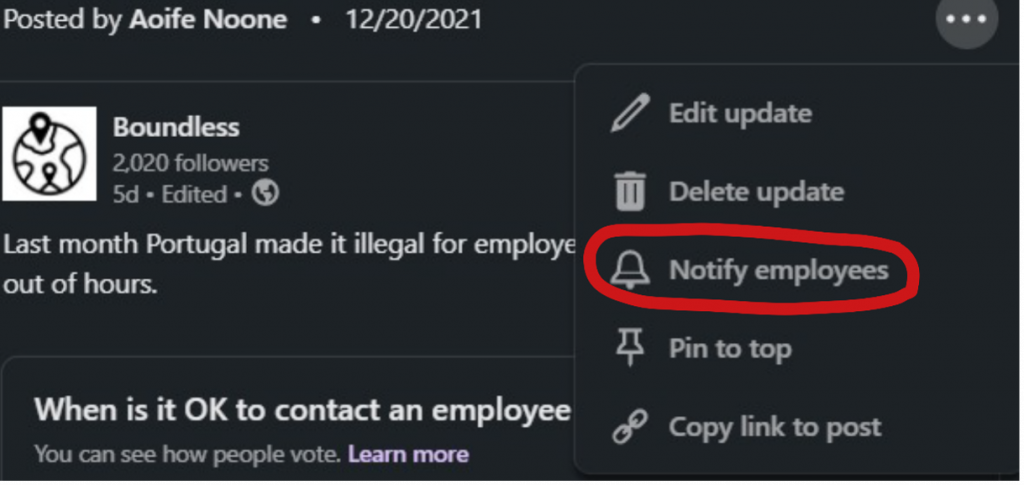
There are two ways to ask your employees to support the company posts.Option 1: after you post, click on the three dots to the top right of your post and select the option ‘Notify Employees’. Employees will then receive a notification in LinkedIn that the company has posted prompting them to engage with the post. When an employee Likes or Comments on a post, that post will then appear in their newsfeeds exposing your content to a new audience and therefore opportunity to gain followers.
Note, this feature can only be used once in every 24 hour period and employees must have your company as their current employer on their LinkedIn profile in order to receive a notification.
Option 2: companies with 11 employees or more have access to LinkedIn’s ‘Recommend to Employees’ feature which sits underneath the ‘Content’ tab. Once selected, simply copy your post text, upload any media (such as photos) and hit ‘Recommend’.
Note, to access this feature, make sure your Company Size is identified as 11 employees or more. This is set within the Company Overview, which you’ll find by clicking on ‘Edit Page’ on the company homescreen.

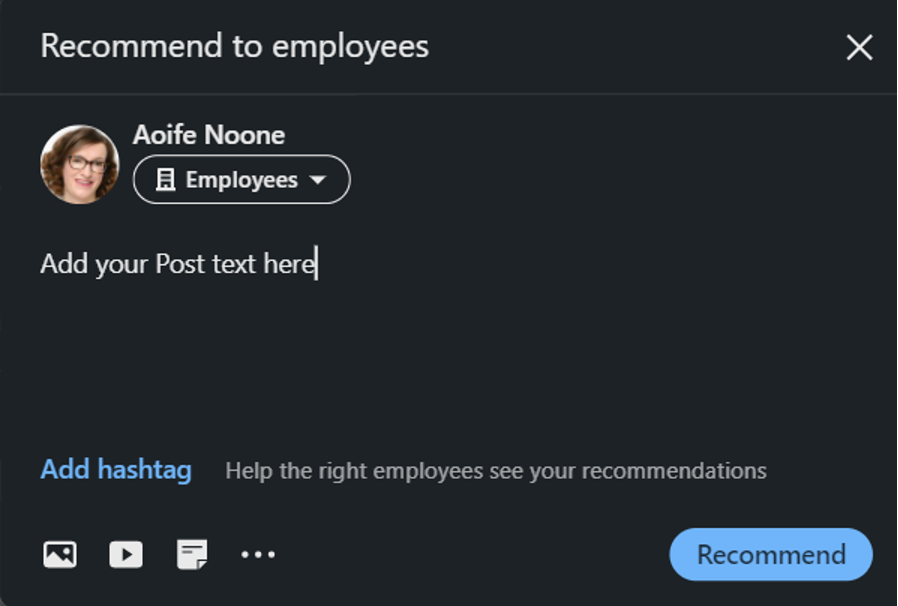
There are two big wins from using this feature – firstly, it enables employees to share the company post as if it were their own which is preferable to employees hitting the ‘Share’ button on the company page post (plus a big time-saver for employees eager to post more on LinkedIn).
Secondly, Analytics. Page Admins can see how many posts employees posted using this feature and how they performed which are a terrific addition to the usual reporting on the performance of company posts.
Invest time in growing your company’s LinkedIn presence
According to LinkedIn, once your page gains 150 followers, the opportunity for growth becomes exponential. So, it really is worth investing the time and effort to reach this number.
Regular posting and engaging with comments on yours post are then key to maintaining and building that momentum. And as your page grows, the opportunities to increase brand awareness, generate leads and much more are endless.


0 Comments